Making interactive
WebXR
Experiences
XR?!
- XR stands for "Mixed Reality"
- Includes AR, and VR
Augmented Reality
Augments the real world with computer graphics
There are two main AR systems:
- Marker-based systems
- Marker-less systems
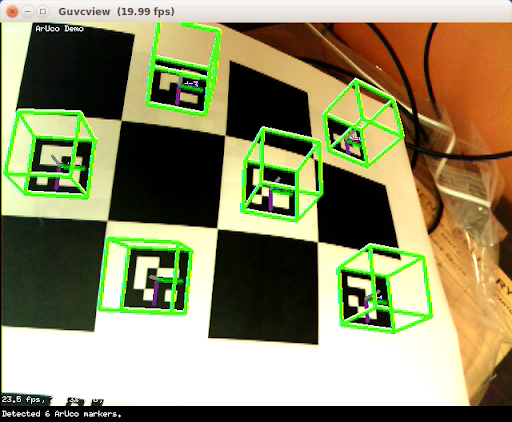
Marker-based AR
Uses a visual marker to unproject the image and obtain world coordinates for the camera
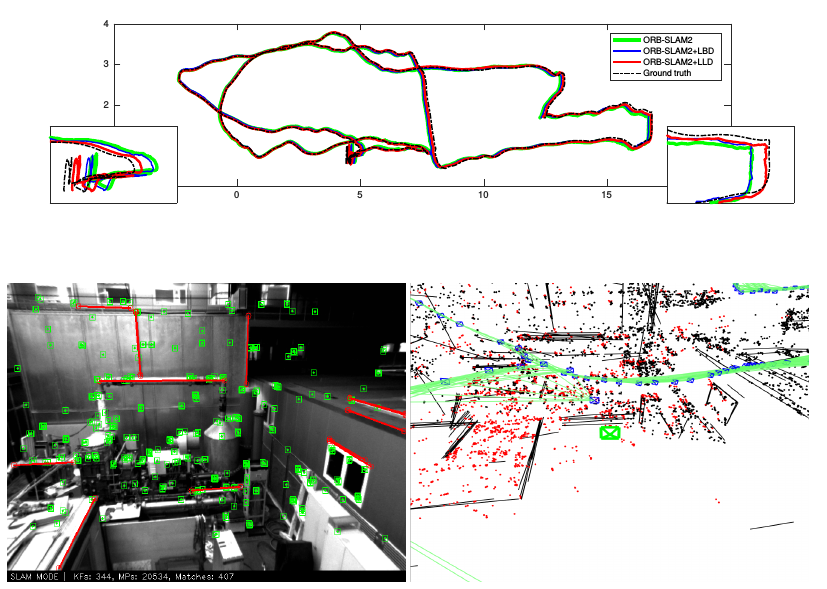
Marker-less AR
Uses unique features between frames to detect camera location and mapping (SLAM)
What does WEBXR do???!
The WebXR Device API provides the following key capabilities:
- Find compatible VR or AR output devices
- Render a 3D scene to the device at an appropriate frame rate
- (Optionally) mirror the output to a 2D display
- Create vectors representing the movements of input controls
Compatibility
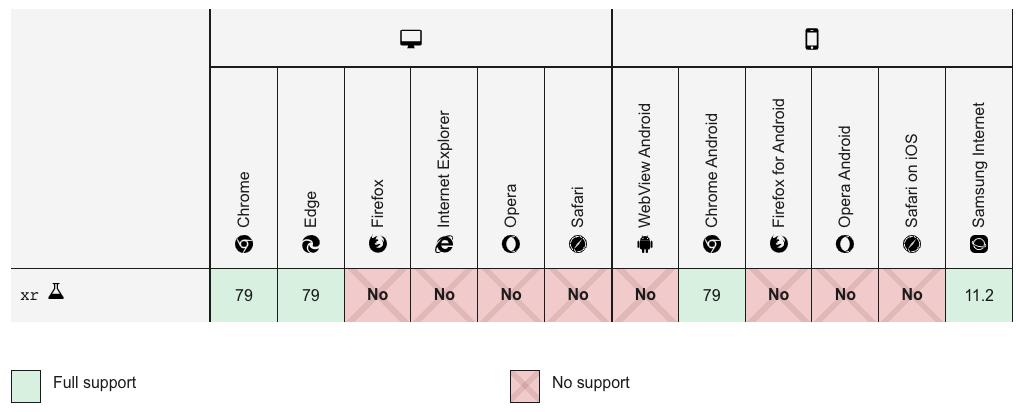
Compatibility

What can I use?
ARjs - link
- Built on top of JSARToolKit5
- JSARToolKit5 is a JS (Emscripten) port of ARToolkit and uses WebAssembly
- AR.js has built in support for THREE.js and AFrame
The Engine
import Scenes from './scenes';

class Engine {

  constructor() {
    this.times = [];
    this.fps;

    this.markerFound;
  }

  init() {
    this.scene = new THREE.Scene();
    this.clock = new THREE.Clock();

    this.camera = new THREE.Camera();
    this.scene.add(this.camera);

    let ambientLight = new THREE.AmbientLight( 0x333333, 0.5 );
	  this.scene.add( ambientLight );

    this.sunlight = new THREE.PointLight(0xffffff, 1, 100);
    this.sunlight.position.set(5, 5, 5);
    this.scene.add(this.sunlight);

    this.renderer = new THREE.WebGLRenderer({
      antialias : true,
      alpha: true
    });
    this.renderer.setClearColor(new THREE.Color('lightgrey'), 0)
    this.renderer.setSize( 640, 480 );
    document.getElementById('container').appendChild(this.renderer.domElement);

    this.addEvents();

    this.createARProfile();

    this.createARSource();

    this.createARContext();

    this.createARScene();

    this.render();
  }

  addEvents() {
    window.addEventListener('resize', () => this.onResize());
    window.addEventListener('orientationchange', () => this.onResize());
  }

  onResize() {
    this.arToolkitSource.onResizeElement()
		this.arToolkitSource.copyElementSizeTo(this.renderer.domElement)
		if ( this.arToolkitContext.arController !== null ){
			this.arToolkitSource.copyElementSizeTo(this.arToolkitContext.arController.canvas)
		}
  }

  createARProfile() {
    this.arProfile = new THREEx.ArToolkitProfile();
    this.arProfile.sourceWebcam();
  }

  createARSource() {
    this.arToolkitSource = new THREEx.ArToolkitSource(this.arProfile.sourceParameters);
    this.arToolkitSource.init(() => this.onResize());
  }

  createARContext() {
    this.arToolkitContext = new THREEx.ArToolkitContext({
      ...this.arProfile.contextParameters,
      cameraParametersUrl: '/data/camera_para.dat',
      detectionMode: 'mono',
      patternRatio: .75
    });

    this.arToolkitContext.init(() => this.camera.projectionMatrix.copy( this.arToolkitContext.getProjectionMatrix() ));
  }

  createARScene() {
    this.sceneRoot = new THREE.Group();
    this.scene.add(this.sceneRoot);

    this.marker = new THREEx.ArMarkerControls(this.arToolkitContext, this.camera, {
      ...this.arProfile.defaultMarkerParameters,
      patternUrl: '/data/pattern-ar-marker.patt',
      changeMatrixMode: 'cameraTransformMatrix',
    });

    window.addEventListener('markerFound', () => this.markerFound = true);
    window.addEventListener('markerLost', () => this.markerFound = false);

    switch (window.scene) {
      case 2:
        this.demoScene = new Scenes.Demo2(this);
        break;
      default:
        this.demoScene = new Scenes.Demo1(this);
    }
  }

  update() {
    // update artoolkit on every frame
	  if (this.arToolkitSource.ready !== false) {
      this.arToolkitContext.update(this.arToolkitSource.domElement);
      this.onResize();

      this.sunlight.position.set(this.camera.position.x, this.camera.position.y, this.camera.position.z);

      if (this.markerFound) {
        this.sceneRoot.visible = true;
      } else {
        this.sceneRoot.visible = false;
      }

      this.demoScene.update();
    }
  }

  render() {
    const now = performance.now();
    while (this.times.length > 0 && this.times[0] <= now - 1000) {
      this.times.shift();
    }
    this.times.push(now);
    this.fps = this.times.length;
    if (document.getElementById('frameRate')) document.getElementById('frameRate').innerText = `${this.fps} FPS`;

    this.update();

    this.renderer.render(this.scene, this.camera);

    window.requestAnimationFrame(() => this.render());
  }
}

export default Engine;
Demo 1
export default class Demo1 {
  constructor(engine) {
    // load the assets

    const gltfLoader = new THREE.GLTFLoader();
    gltfLoader.load('/data/head.glb', gltf => {
      gltf.scene.scale.set(.4, .4, .4);
      engine.sceneRoot.add(gltf.scene);
    });
  }

  update() {
    // update the scene
  }
}
Demo 1


Interactivity
Demo 2
export default class Demo2 {
  constructor(engine) {
    this.engine = engine;

    this.touchStart;
    this.touchEnd;

    this.paper = [];

    this.loadAssets();

    this.addEvents();
  }

  loadAssets() {
    const cylinderGeometry = new THREE.CylinderGeometry( .2, .2, .1, 16 );
    const cylinderMaterial = new THREE.MeshPhongMaterial( {color: 0x00000, side: THREE.BackSide} );
    this.cylinder = new THREE.Mesh( cylinderGeometry, cylinderMaterial );
    this.engine.sceneRoot.add(this.cylinder);

    const paperGeometry = new THREE.SphereGeometry( .1, 6, 6 );
    const paperMaterial = new THREE.MeshPhongMaterial( {color: 0xFFFFFF} );
    this.paperMesh = new THREE.Mesh( paperGeometry, paperMaterial );
  }

  addEvents() {
    this.engine.renderer.domElement.addEventListener('touchstart', e => this.handleStart(e), false);
    this.engine.renderer.domElement.addEventListener('touchend', e => this.handleEnd(e), false);
    this.engine.renderer.domElement.addEventListener('touchmove', e => this.handleMove(e), false);
  }

  handleStart(e) {
    e.preventDefault();

    this.touchStart = {
      touch: e.changedTouches[0],
      time: this.engine.clock.getElapsedTime(),
    }

    console.log(this.touchStart);
  }

  handleEnd(e) {
    e.preventDefault();

    this.touchEnd = {
      touch: e.changedTouches[0],
      time: this.engine.clock.getElapsedTime(),
    }

    console.log(this.touchEnd);

    this.paper.push(new Paper(this));
  }

  handleMove(e) {
    e.preventDefault();
  }

  update() {
    // update the scene

    this.paper.forEach(paper => paper.update(this.engine));
  }
}


class Paper {
  constructor(parent) {
    this.parent = parent;
    this.mesh = this.parent.paperMesh.clone();
    this.mesh.position.set(this.parent.engine.camera.position.x, this.parent.engine.camera.position.y, this.parent.engine.camera.position.z);
    this.direction = this.parent.engine.camera.getWorldDirection().divide(new THREE.Vector3(4, 4, 4));
    this.gravity = 0;
    this.parent.engine.sceneRoot.add(this.mesh);
  }

  destroy(engine) {
    this.dead = true;
    engine.sceneRoot.remove(this.mesh);
  }

  collision(object1, object2) {
    object1.geometry.computeBoundingBox(); //not needed if its already calculated
    object2.geometry.computeBoundingBox();
    object1.updateMatrixWorld();
    object2.updateMatrixWorld();

    var box1 = object1.geometry.boundingBox.clone();
    box1.applyMatrix4(object1.matrixWorld);

    var box2 = object2.geometry.boundingBox.clone();
    box2.applyMatrix4(object2.matrixWorld);

    return box1.intersectsBox(box2);
  }

  kill(engine) {
    this.destroy(engine);
  }

  update(engine) {
    if (this.dead) return;

    this.mesh.position.add(this.direction);
    this.mesh.position.z += this.gravity / 50;

    this.gravity = Math.min(this.gravity + .1, 3.2);

    if (this.collision(this.mesh, this.parent.cylinder)) {
      console.log('collided !!');
      this.kill(engine);
    } else if (this.mesh.position.distanceTo(engine.camera.position) > 30) {
      console.log('dying');
      this.kill(engine);
    }
  }
}
Demo 2

What Next?
Clone the repo. Play with the code. See what you can do with it!
https://github.com/beclamide/webxr-demoThanks!
 |
@beclamide |
 |
@beclamide |
 |
@johnmbower |